An independent restaurant owner recently made a handful of changes to how her online menu was structured and written – nothing about the food itself – and saw online sales climb by roughly £1,500 to £2,000 a month. Another multi-site pizzeria operator, the same one behind several of the growth lessons we’ve covered before, reported month-to-date sales growth of nearly 28% after a similar menu overhaul.
Neither result came from a new dish, a discount, or a bigger marketing budget. It came from treating the online menu itself as a sales tool – something guests have to navigate entirely on their own, with no server standing by to answer a question or nudge them toward a better order. Most restaurant menus, printed or online, were never really designed with that in mind. This article sets out seven specific, low-cost changes that make a measurable difference to how much guests order and how easily they find you in the first place.
Fix 1: Consolidate your categories
It’s tempting to assume that more menu options mean more sales – more chances for a dish to match what a guest fancies. The data consistently says the opposite.
Seven practical changes to your menu's structure, descriptions, and search visibility that increase online orders without touching the food. |
|
When guests are faced with too many choices, they experience what psychologists call decision fatigue: faced with an overwhelming list, people either default to the cheapest option or, more often, abandon the order altogether rather than work through it.
There’s a second, quieter benefit to a tighter menu: fewer categories and fewer items usually mean more shared ingredients across dishes, which gives you more negotiating leverage with suppliers, less waste, simpler inventory, and a faster kitchen. A useful benchmark is to keep top-level menu categories to somewhere between five and ten, so guests can scan the whole menu without endless scrolling, and your kitchen isn’t juggling dozens of barely-related ingredients.
Fix 2: Write descriptions as if no one’s there to explain
In the dining room, a guest who’s unsure what a dish involves can just ask the server. Online, there’s no one to ask – guests have to work it out entirely from what’s written on the page. A vague or missing description doesn’t just under-sell a dish; it actively costs orders, because a confused guest is far more likely to abandon the order, or ring the restaurant and give up when they’re left holding on the phone, than to take a chance on something unclear.
The fix is straightforward: every online menu item needs a description detailed enough that a guest knows exactly what they’re getting, with no follow-up questions needed. A well-known example from the pizzeria mentioned earlier is a specialty pizza given a memorable, unusual name — paired with a description that spells out every topping, the texture, and why it’s worth trying. That combination does two things: it removes any hesitation about ordering something unfamiliar, and it often increases the size of the order too, because guests can see exactly what comes with a dish – extra sauces, specific toppings – and are more inclined to add to it once they know precisely what’s on offer.
Fix 3: Get the order of your modifiers right
When a guest customises an item online – size, toppings, removals, extras – most menus list those options in whatever order is easiest to build, not the order a guest actually thinks in. That mismatch confuses, and confused guests don’t finish their order.
There’s a natural sequence that mirrors how people actually build a meal in their head, and it’s worth following on every customisable item:
- Required choices first — the things a guest has to decide before anything else, such as size
- Additions next — what a guest wants to add, the exciting part of building their order
- Removals third — what a guest wants left out, which reads more naturally after they’ve already pictured what they do want
- Extras last — the small add-ons that complete the dish, such as a dipping sauce or side
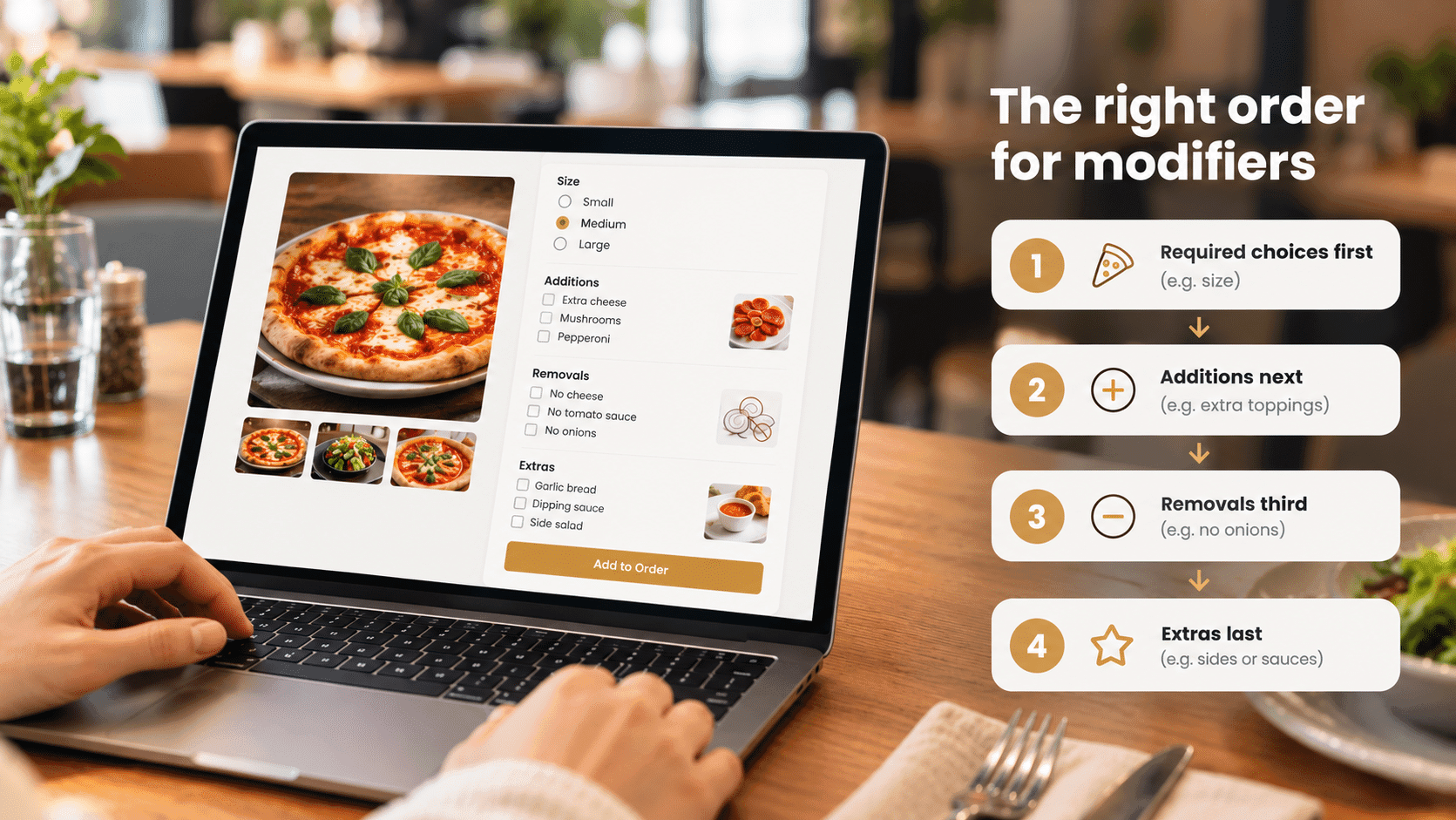
Laid out this way, ordering feels intuitive rather than like a form to fight through, and guests are meaningfully more likely to complete an order rather than give up partway and call instead, or simply go elsewhere.
Fix 4: Make sure your menu matches what people actually search for
Most restaurant discovery in 2026 still starts on Google, not social media or delivery apps. That means your online menu needs to use the same words your potential guests are actually typing into Google – not necessarily the most authentic, creative, or brand-appropriate name you’d choose for a dish.
A useful cautionary example: a taqueria owner wanted his online menu to feel authentic, so he listed popular dishes only in Spanish. The food was excellent, but almost nobody in his area was searching in Spanish for those dishes – they searched in English, using the everyday name. Because his menu items didn’t match those search terms, Google had no way to connect his restaurant to that demand, and he stayed invisible for searches he should have dominated.
You don’t need to guess at this. Google’s own free Keyword Planner tool shows how many people search for a given dish name, in a given town, each month, along with related terms. For an everyday, widely searched dish – pepperoni pizza, chicken wings, a calzone – use the name people actually search for, not a stylised alternative. Reserve creative, unique names for genuinely original dishes that nobody is searching for by name anyway, since there’s no search demand to match in the first place.
Detailed, specific descriptions help here too. When a menu item’s name is consistently surrounded by rich, relevant detail about what it contains, search engines treat that item as a more credible, well-established match for related searches – which is one more reason Fix 2 and Fix 4 work best together, not as separate projects.
Fix 5: Build a menu Google can actually read
A beautifully designed menu does nothing for your search visibility if it isn’t genuinely readable by search engines. Two changes make the biggest difference here.
Stop using a PDF as your only menu
A PDF menu is a common shortcut, but it’s close to invisible to Google. Dish names and prices locked inside a PDF generally cannot be read and matched the way a structured, text-based menu can. That means a restaurant with a genuinely excellent calzone can be absent from a ‘best calzone near me’ search, simply because Google never had a way to know the dish existed.
Add proper schema markup
Schema markup is structured data added to your website’s code that spells out, in a format search engines understand directly, exactly what your restaurant offers — menu items, prices, cuisine type, and more. It sounds technical, but the payoff is real: restaurants with correctly implemented schema markup consistently see more traffic from Google, because it gives search engines additional confidence in recommending them, and unlocks richer, more detailed listings in search results. Google’s own free Rich Results Test tool lets you check whether your site’s markup is set up correctly, and flag it to whoever manages your website if it isn’t.
Not sure if your menu is actually working for you?
ThisRapt reviews restaurant menus for exactly these gaps – structure, descriptions, and Google visibility.
Fix 6: Keep ordering on your own website
When a guest clicks ‘order now’ on your website, the experience should stay on your own domain, rather than bouncing to a separate ordering platform on a completely different website. This matters for two distinct reasons.
The first is about how Google reads your traffic. Google can see when visitors it sends to your site immediately leave for a different domain – a high bounce rate straight after arriving. When that happens because guests are being redirected off-site to order, it signals to Google that visitors aren’t finding what they came for, which works against you over time.
The second reason is about guest trust. Clicking ‘order now’ and landing on an unfamiliar website, with different branding and a domain name that means nothing to the guest, creates a moment of doubt – is this safe, is this really the restaurant I meant to order from? That hesitation is enough to make some guests abandon the order entirely, or head to a delivery app instead. Keeping the whole ordering journey on your own website removes that friction, and it means you retain your guests’ contact details and order history directly, rather than handing that relationship to a third party — which matters enormously for the kind of ongoing, direct remarketing covered in our piece on flat restaurant sales.
Fix 7: Build up selling into the menu, not into staff training
Generic upsell prompts – ‘would you like a drink with that?’ – are easy to ignore. Specific, contextual suggestions aren’t. When a guest adds a pizza to their basket, a suggestion for the specific side or drink that pairs with it – not just any drink, but the one people most commonly order alongside that dish – reads as genuinely helpful rather than as a sales tactic.
This works because of where restaurant profit actually comes from. Sides, drinks, and desserts typically carry a far lower food cost than a main dish. A side that costs well under a pound to make but sells for several pounds does far more for your margin than the main course it’s paired with – which is exactly the logic behind why fast-food chains built their profitability around fries and drinks rather than the burger itself.
Built directly into your online ordering system, contextual upselling happens automatically on every order, without relying on staff to remember to suggest it or worrying about it feeling pushy in the moment. The result is a meaningfully larger average order, with no extra effort required on a busy shift.
Key takeaways
- Too many menu choices cause decision fatigue; keeping top-level categories to roughly five to ten items makes ordering easier and can lower food cost
- Detailed, specific descriptions remove guest hesitation online and support your search visibility at the same time
- Ordering modifiers in a natural sequence – required, additions, removals, extras – reduces abandoned orders
- Menu item names should match what people actually search for locally, not just what sounds most authentic or creative
- A PDF-only menu and missing schema markup can make an excellent dish invisible to Google, however good it tastes
- Keeping ordering on your own domain protects both your Google visibility and your ownership of guest data
- Specific, contextual upsell suggestions built into the ordering system increase average order value without relying on staff
Where ThisRapt fits in
Menu structure and online ordering setup are usually decisions for you and your website or POS provider. But making sure your menu is genuinely visible to the people searching for exactly what you serve – through local SEO, schema markup, and increasingly AI search – is exactly where we help UK hospitality businesses. If that’s the part of this list that feels furthest from sorted, it’s worth a conversation.
Want to know if Google can actually find your menu?
ThisRapt works exclusively with hospitality businesses on exactly this kind of fix.
FAQs
For most independent restaurants, a focused menu of well-executed dishes outsells a sprawling one. The goal isn’t necessarily fewer dishes overall, but fewer top-level categories and a more manageable structure, so guests can actually find and decide on something without feeling overwhelmed.
No – start with your best-selling and highest-margin items, since that’s where better descriptions have the most immediate impact on revenue, then work through the rest of the menu over time.
It depends on your website platform. Some website and menu providers add basic schema automatically; for a custom-built site, it usually needs a developer or your website provider to implement it properly, though checking whether it’s already in place only takes a couple of minutes with Google’s free testing tool.
Ask your provider directly whether an on-domain or embedded ordering option is available — many platforms offer this, even if it isn’t switched on by default. If it isn’t possible with your current provider, it’s worth factoring into your next system review, given the impact on both conversion and guest data ownership.
Start with removing a PDF-only menu and tightening your descriptions – both are entirely within your control, cost nothing beyond time, and directly affect whether Google can recommend you and whether guests actually complete their order once they land on your site.